Web app(bShare) progress (asp.net mvc) part 1

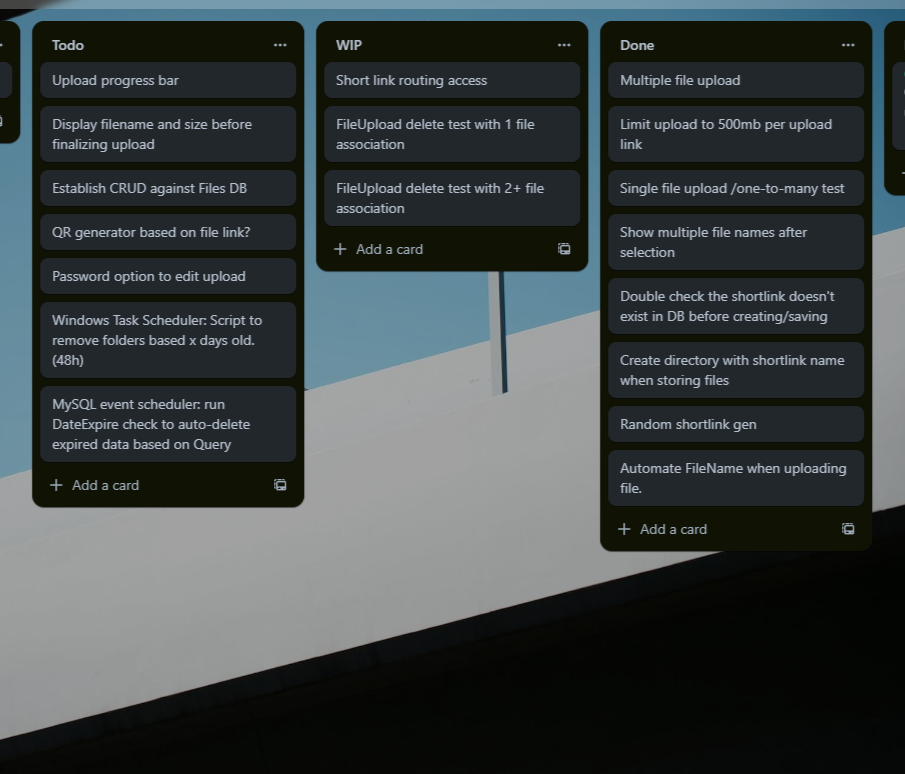
Steady progress on my mini web app BShare. My Goal is to finish this by the end of the month. I am stuck troubleshooting routing of view access towards random generated shortlinks.

http://site.com/link/{string}
The controller checks the database if the string exists, and if it exists, it will return the view with the same url. It’s good to take a few hours off, or continue the next day for a fresh clear mind.
This is usually the same with music production. But in case of music production, your ears need to take a break so it’s almost mandatory to wait until the next day to notice the slightest sound differences.

ShortLink Generator (random gen)

My current coding project is a temporary file store/share web app.
Now days everyone uses free coud services such as dropbox, google drive, and many others, but I remember the days where temp upload and share sites were a thing.
I still think it’s convenient for those that don’t use any cloud storage.
SO, one of the important functions is the shortlink generator. The link you share with your friends to access the temporary file you’ve uploaded.
Here’s the simple c# code I will be using.

The short link will be generated, and from there through DbContext, the app will make sure that the short link is in fact unique. If !unique, re-generate and check again. I highly doubt the app would have to re-generate though… But you always plan for the worst right.

static void Main(string[] args)
{
    // START OF MAIN /////////////////////


    Console.WriteLine(ShortLinkGenerator(6));


    // END OF MAIN /////////////////////
}

public static string ShortLinkGenerator(int length)
{
    Random random = new Random();
    const string chars = "ABCDEFGHIJKLMNOPQRSTUVWXYZabcdefghijklmnopqrstuvwxyz12345679";
    return new string(Enumerable.Repeat(chars, length).Select(s => s[random.Next(s.Length)]).ToArray());
}

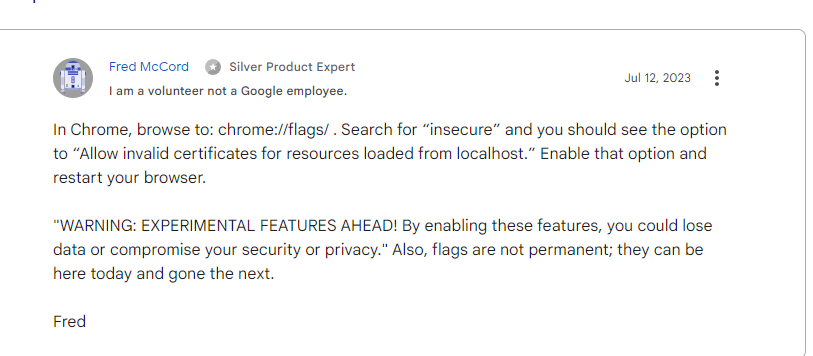
Chrome, allowing localhost bad ssl cert

I recently rebuilt my comptuer with a fresh install of Windows. I’ve lost many small custom configs here and there. Including the one for Chrome where you can allow bad ssl certs to be loaded.
You need this to test out your apps via localhost using Chrome.

Solution, on image below. This is something you don’t do often, I’m pretty sure I’ll be looking this up again in a few years lol. Now i’ll just search my own blog for this.

Asp.net core, system environment variables

I started working on a new small project. I took some time in reading about my option on storing environment variables. (For like the 10th time..)
I am using AWS’s Secrets Manager for my NanisuruApp, but this time around I decided to simply utilize the System Environment Variables on Windows.

Steps taken (Asp.net Core 6.x+)
1.) Added my custom prefix to use.
builder.Configuration.AddEnvironmentVariables(prefix: “CustomPrefix_”);

example environtment variable:
CustomPrefix_DevConnectionString = value

2.) Created 2 profile in launchSettings.json for a “Development” and “Production” profile.
“ASPNETCORE_ENVIRONMENT”: “Production” and copy and paste for Development

3.) Create a cooresponding appsettings file for both Development and Production.
appsettings.Development.json
appsettings.Production.json

something like this (appsettings.Development.Json)

{
  "Logging": {
    "LogLevel": {
      "Default": "Information",
      "Microsoft.AspNetCore": "Warning"
    }
  },
  "AllowedHosts": "*",
  "DevConnectionString": "connection"
}

4.) Then I did a sloppy job at loading different connection info based on the project’s environment.

(Program.cs)

// Enable custom environment variables.
builder.Configuration.AddEnvironmentVariables(prefix: "CustomPrefix_");

// Store database connection string
string? connectionString = null;

// Create environment variable to check dev/prod/staging status
IHostEnvironment currentEnvironment = builder.Environment;

// Load different database connection string depending on dev or prod environment
if (currentEnvironment.IsDevelopment())
{
    connectionString = builder.Configuration.GetValue<string>("DevConnectionString");
}
else if (currentEnvironment.IsProduction())
{
    connectionString = builder.Configuration.GetValue<string>("ProdConnectionString");
}

Something important. After adding/editing system environment variables, make sure to restart Visual Studio. These variables are only loaded during launch of the editor.

Doing another fundamental c# run

Touching up on the fundamentals of c# again by going over a few courses that I bought on Udemy, but never got around. Quick and dirty Tic Tac Toe, bare minimum functional.

internal class Board
{
    string[,] _board;
    bool _isPlayer1 = true;
    string _playerName = "Player1";
    string _playerTic = "O";
    string _playerSymbol;
    

    public char Selection { get; set; }

    public string[,] GameBoard
    {
        get => _board;
        set => _board = value;
    }

    public Board()
    {
        _board = new string[,]        
        {
            { "1", "2", "3" },
            { "4", "5", "6" },
            { "7", "8", "9" }
        };
    }

    public void Run()
    {
        Console.WriteLine("Welcome to your tic tac toe game.");
        for (int i = 0; i < GameBoard.GetLength(0); i++)
        {
            for (int j = 0; j < GameBoard.GetLength(1); j++)
            {
                Console.Write("_" + GameBoard[i, j] + "_|");
            }
            Console.WriteLine("");
        }
    }

    public void ShowBoard()
    {
        for (int i = 0; i < GameBoard.GetLength(0); i++)
        {
            for (int j = 0; j < GameBoard.GetLength(1); j++)
            {
                Console.Write("_" + GameBoard[i, j] + "_|");
            }
            Console.WriteLine("");
        }
    }

    public void Start()
    {
        Console.WriteLine($"{_playerName}: It's your turn (enter #): ");
        Selection = Console.ReadKey().KeyChar;
        Console.WriteLine("_____________________");
        Console.WriteLine();
        Console.WriteLine();
        Select();

    }

    public void Select()
    {
        for (int i = 0; i < GameBoard.GetLength(0); i++)
        {
            for (int j = 0; j < GameBoard.GetLength(1); j++)
            {
                if (GameBoard[i, j] == Selection.ToString())
                {
                    GameBoard[i, j] = _playerTic;
                }
            }
        }

        WinCheck();
        ShowBoard();

        _isPlayer1 = !_isPlayer1;

        if (!_isPlayer1)
        {
            _playerName = "Player2";
            _playerTic = "X";
        }
        else
        {
            _playerName = "Player1";
            _playerTic = "O";
        }
        
        Start();
    }

    public void WinCheck()
    {
        _playerSymbol = _isPlayer1 ? "O" : "X";

        if (GameBoard[0, 0] == _playerSymbol && GameBoard[0, 1] == _playerSymbol &&
            GameBoard[0, 2] == _playerSymbol ||
            GameBoard[1, 0] == _playerSymbol && GameBoard[1, 1] == _playerSymbol &&
            GameBoard[1, 2] == _playerSymbol ||
            GameBoard[2, 0] == _playerSymbol && GameBoard[2, 1] == _playerSymbol &&
            GameBoard[2, 2] == _playerSymbol ||

            GameBoard[0, 0] == _playerSymbol && GameBoard[1, 0] == _playerSymbol &&
            GameBoard[2, 0] == _playerSymbol ||
            GameBoard[0, 1] == _playerSymbol && GameBoard[1, 1] == _playerSymbol &&
            GameBoard[2, 1] == _playerSymbol ||
            GameBoard[2, 0] == _playerSymbol && GameBoard[1, 2] == _playerSymbol &&
            GameBoard[2, 2] == _playerSymbol ||

            GameBoard[0, 0] == _playerSymbol && GameBoard[1, 1] == _playerSymbol &&
            GameBoard[2, 2] == _playerSymbol ||
            GameBoard[0, 2] == _playerSymbol && GameBoard[1, 1] == _playerSymbol &&
            GameBoard[2, 0] == _playerSymbol)
        {
            if (_isPlayer1)
            {
                Console.WriteLine("=============");
                Console.WriteLine("Player1 Wins!");
                Console.WriteLine("=============");
                Environment.Exit(0);
            }
            else
            {
                Console.WriteLine("=============");
                Console.WriteLine("Player2 Wins!");
                Console.WriteLine("=============");
                Environment.Exit(0);
            }
        }
    }
}

Pixar’s Elemental

Pixar always delivers on giving you a nice warm feeling by the time you finish watching the film.
Loved the design of the city and characters. This was a must watch for me as I have the tattoos of the four elements.

30 days of code: Day 10

https://www.hackerrank.com/challenges/30-binary-numbers/

To be honest, I looked this one up. In fact, many people had the same solution. Don’t really know who the original is, but thanks. Decided not to write the Task, head to link above for full details on the problem.

var n = int.Parse(Console.ReadLine());

var sum = 0;
var max = 0;


while (n > 0)
{
    if (n % 2 == 1)
    {
        sum++;

        if (sum > max)
            max = sum;
    }
    else sum = 0;

    n = n / 2;
}

Console.WriteLine(max);

30 days of code: Day 9

https://www.hackerrank.com/challenges/30-recursion/

Recursions were new to me. Haven’t had to use them with my previous apps. Or maybe I could have? Learned Summation, Factorial, and Exponentiation.

Sample Input
3

Sample Output
6

int n = Convert.ToInt32(Console.ReadLine());
static int Factorial(int n)
{
    if (n == 1)
    {
        return 1;
    }
    else
    {
        return n * Factorial(n - 1);
    }
}

Console.WriteLine(Factorial(n));

30 days of code: Day 8

https://www.hackerrank.com/domains/tutorials/30-days-of-code

Using a Dictionary
Sample Input

3
sam 99912222
tom 11122222
harry 12299933
sam
edward
harry
Sample Output

sam=99912222
Not found
harry=12299933
// Input number of data to retrieve
int nameCount =Convert.ToInt32(Console.ReadLine());

// Create Dictionary
Dictionary<string, string> phoneBook = new Dictionary<string, string>();

// User adds name and phonenumber to Dictionary x times
for (int i = 0; i < nameCount; i++)
{
    string inputPhoneBook = Console.ReadLine();
    string[] nameAndPhoneNumber = inputPhoneBook.Split(" ");
    string name = nameAndPhoneNumber[0];
    string phoneNumber = nameAndPhoneNumber[1];

    phoneBook.Add(name, phoneNumber);
}

// Name search and output infinite times
while (true)
{
    string inputName = Console.ReadLine();
    if (!string.IsNullOrEmpty(inputName))
    {
        if (phoneBook.ContainsKey(inputName))
        {
            Console.WriteLine(inputName + "=" + phoneBook[inputName]);
        }
        else
        {
            Console.WriteLine("Not found");
        }
    }
}